The AI plugin for Obsidian
Your data. In Markdown. On your machine.
Notes, AI chats, voice and meetings from desktop, and soon iPhone, all in one vault you own.


Yours to keep
Everything lands as a note.
- Plain Markdown
- Every chat and brief is a .md file.
- On your machine
- A folder you own. Cancel, keep it all.
- Open source
- The plugin is MIT licensed, on GitHub.


Your own AI
Use the AI you already pay for.
Claude Code and Codex run on your own sign‑in. No API keys, no second subscription.


- Claude Code
- Your Claude plan
- Codex
- Your ChatGPT plan
- SystemSculpt
- Ours, on desktop and mobile
Ask before edits, or Auto
Approve every edit. Or let it run.
⏎ Approve esc Deny


Semantic search
Finds what you meant.


Every device, one vault
Obsidian today. iPhone soon. Desktop next.
Obsidian
Desktop and mobile · Now
iPhone
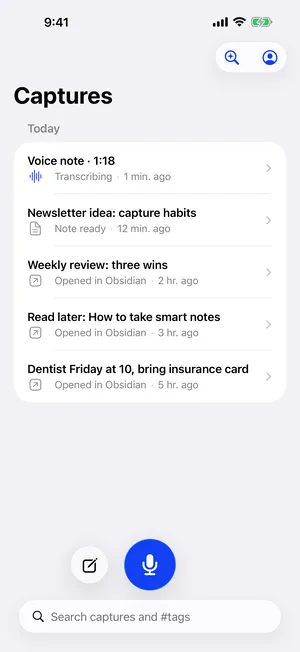
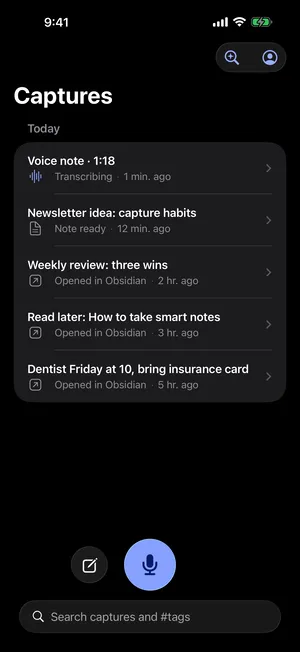
Capture to your vault · Soon
Desktop app
Next
In the works


Pricing
Free to start.
Free
$0
Your own Claude Code or Codex, plus 500 hosted credits.
Install free (opens Obsidian's plugin directory in a new tab)
Questions
What is SystemSculpt?
SystemSculpt is an AI plugin for Obsidian. Your notes, AI chats, voice notes and meeting briefs live in one vault as plain Markdown on your computer, and Claude Code, Codex or SystemSculpt's hosted AI works on them there.
Is SystemSculpt free?
SystemSculpt is free to install. Chat with your installed, signed-in Claude Code or Codex on desktop needs no SystemSculpt account or plan. Those services keep their own accounts and usage. Eligible new accounts can claim 500 one-time starter credits for hosted AI, with no card required. The existing connection flow handles eligibility and email verification. Monthly costs $9 USD per month. Annual costs $90 USD per year. Both unlock the same Pro access on a 5-device personal license and include a monthly hosted-credit allowance.
Can I use my Claude Code or Codex?
Yes. On desktop, chat runs on the Claude Code or Codex already installed and signed in on your computer, working inside your vault. Each keeps its own login and history, and you need no SystemSculpt account or API key.
Where do my notes and chats live?
In your Obsidian vault, a folder of Markdown files on your computer. SystemSculpt saves every chat there as a note, and if you cancel, you keep all of it. AI sees only what you send it or let it read: hosted AI goes through SystemSculpt and its model providers, and Claude Code and Codex use your own accounts.
Can it change my notes?
Only the way you choose. In Ask before edits, every change waits in the chat with its diff until you approve it with Enter or deny it with Esc. In Auto, SystemSculpt's hosted AI creates and edits notes on its own and still asks before moving or deleting them; Claude Code and Codex keep their own rules.
Is it open source?
The SystemSculpt plugin for Obsidian is open source under the MIT license, so anyone can read what it does with their files.
Does it work on mobile?
Yes. SystemSculpt works in Obsidian on phones and tablets, where chat uses SystemSculpt's hosted AI; Claude Code and Codex run on desktop. An iPhone app that captures notes and voice into your vault is coming soon.